
Codebase Blueprint: it all started with Legacy Codebases
As part of our job we have to understand quickly legacy codebases. We dive into codebases that have decades of history and possibly millions of lines of code and we need to understand as much as possible about them as quickly as we can. To do that we have an ace up our sleeve, and this is what I am going to show in this article.
This happens to us because we help companies migrate their legacy systems and this starts with doing a plan, but how can one do a plan if one does not understand the codebase first? We do the migration planning bit through our Migration Blueprint service. A Migration Blueprint typically takes between 10 and 13 weeks. Understanding a codebase of that size, in that time, well enough to give advice somebody will act on, is a challenge. By that I mean, a very difficult challenge.
So we built a tool to help with that. The tool morphed over the years and went through different names. We used to call it Code Insight Studio, and you can find it mentioned under that name in the articles where we described the Migration Blueprint and the Migration CodeCraft. Now we call it Codebase Blueprint. Given we are engineers and creativity is not our strong point, the name of the tool comes from the name of the service. I like to think that we are much better at Language Engineering than at naming. If that is not the case please do not tell me.
The tool is built on the same technology we use for all our other systems: Starlasu and the parsers we developed over the years. This means it understands many different languages: RPG, COBOL, DDS, SQL in its different dialects, PL/SQL, SAS, Visual Basic 6, and many others. On top of that, it has visualizations that are specific to certain environments. For example, for RPG we can render the green screens defined in display files. For Visual Basic 6 we can render the forms.
In this article I want to show you this tool. At the end I will share a few thoughts on where I think tools like this one will be needed in the future.
The video
We recorded a demo of the tool. You can watch it here, or keep reading: in the rest of the article I go through the same features.
The example: TOBi
We cannot show the code of our clients, unless we want them to sue us, and half my job is to avoid that. So we used TOBi, a small open-source IBM i application published by IBM. It is an order management system with the usual stuff: customers, articles, orders, and VAT.
It is small, about 100 files while real ones have… a bit more. That said, I think it has a realistic mix of bits and parts as it contains RPG III, RPG IV both in fixed format and free format, embedded SQL, display files, physical and logical files, and one printer file.
Overview
When we open a codebase, we land on the overview.
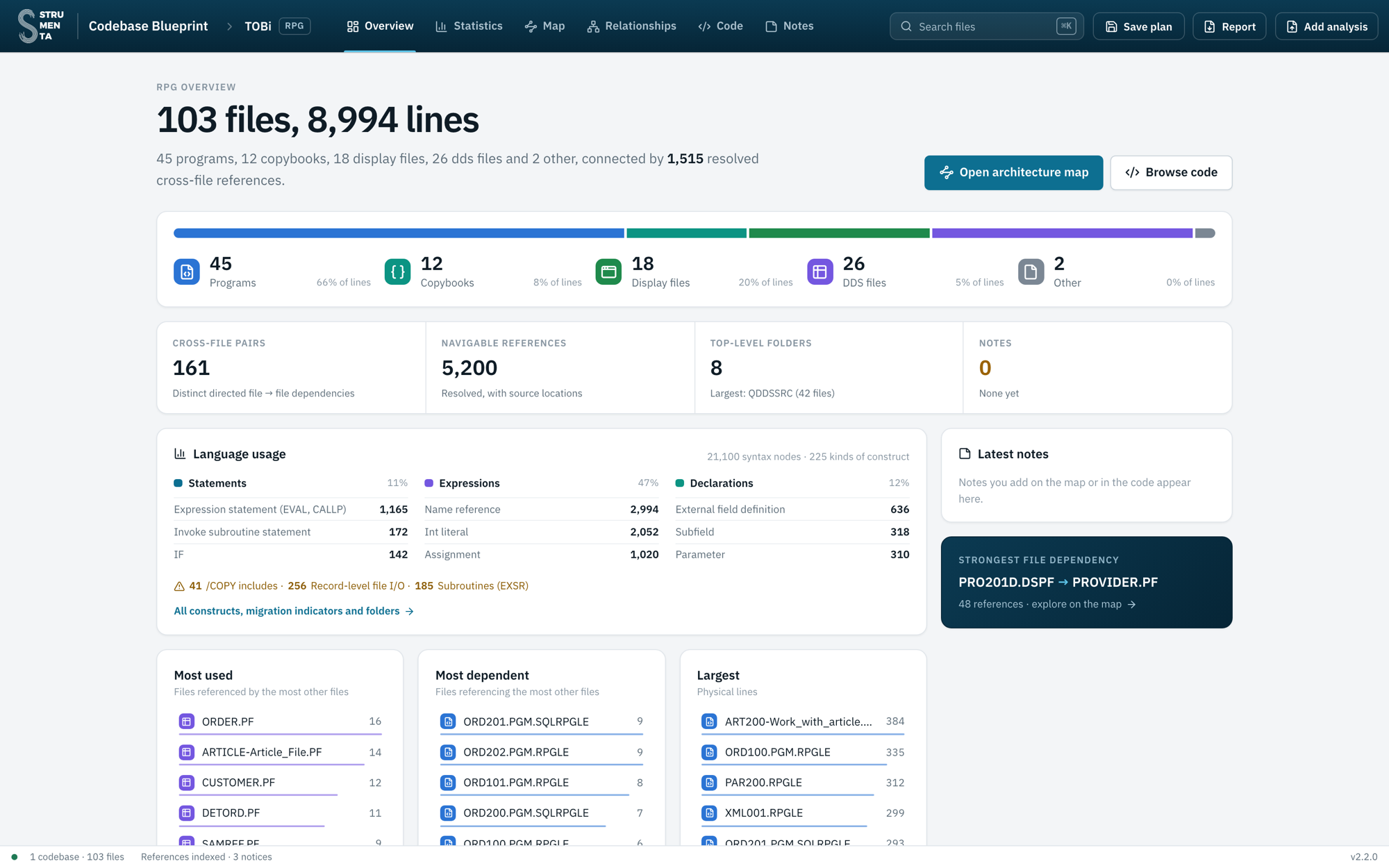
For TOBi we get 103 files and 8,994 lines: 45 programs, 12 copybooks, 18 display files and 26 other DDS files. They are connected by 1,515 cross-file references. The strongest one goes from the screen PRO201D to the provider file: 48 references.
These references are identified through static analysis. This means: deterministic and reliable.
Statistics
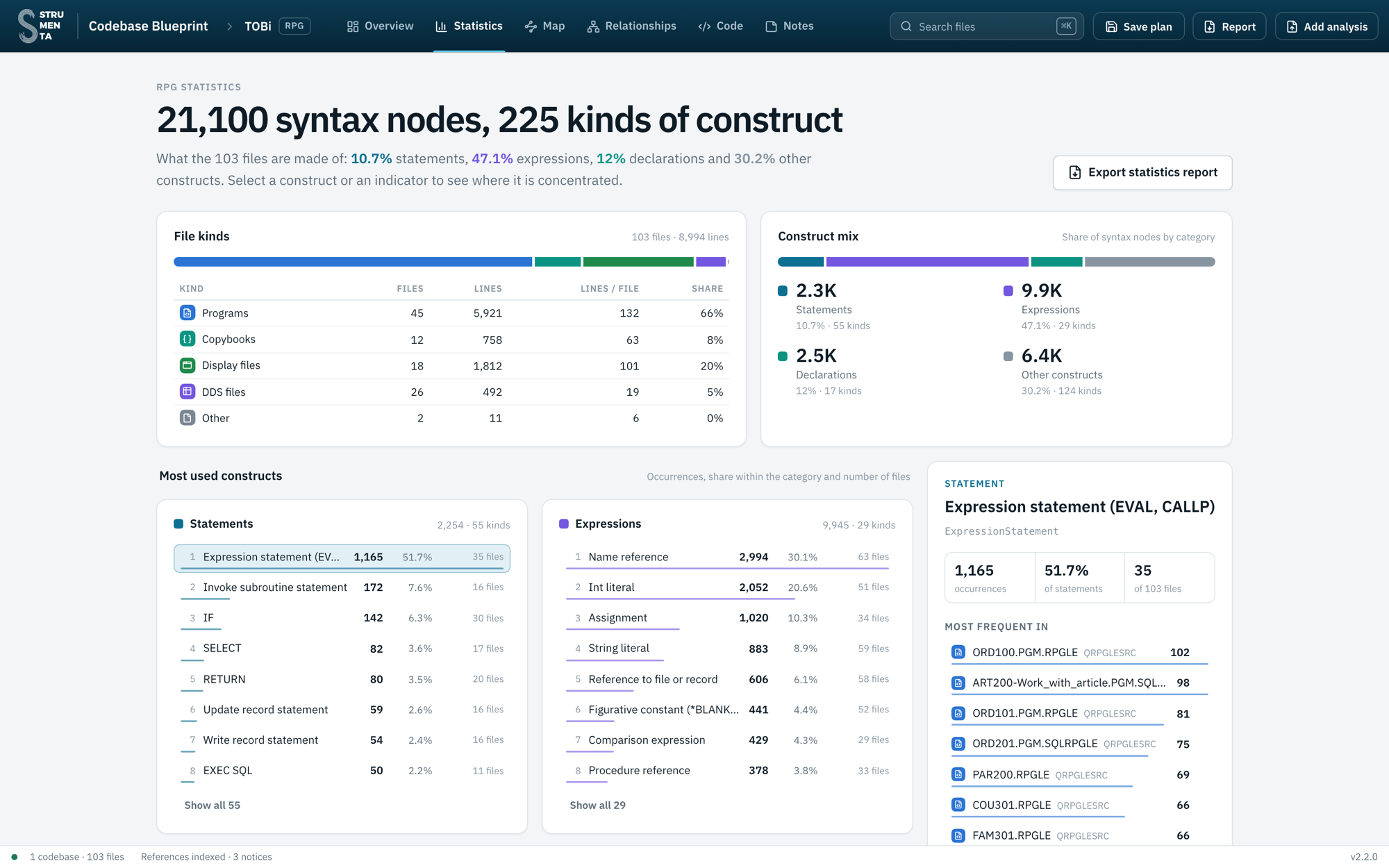
TOBi has 21,100 nodes in its syntax trees, of 225 different kinds. For each kind we see how many times it is used and in how many files.
This is what we look at first in a migration. Every client uses their own subset of the language. A statement used in 35 files must be supported, and supported well. A statement that appears in a single file, because one programmer wanted to try it one day he was bored, well, perhaps we can give it a little less attention.
The tool also lists migration indicators: constructs that typically need attention. We may want to know for example about how people have been using GOTOs.
The map
The map shows how the files depend on each other. By default it groups them by folder.
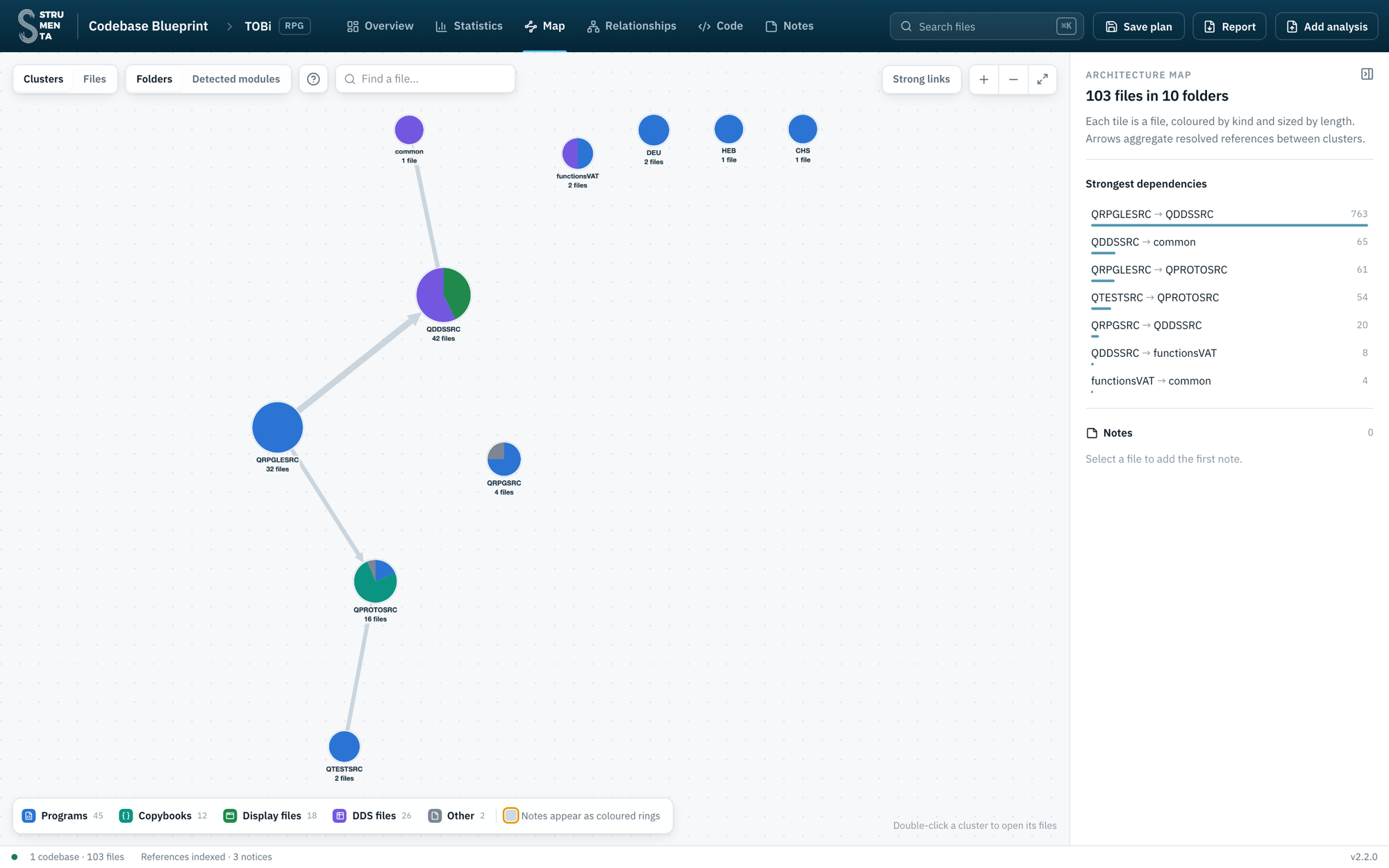
The programs in QRPGLESRC refer to the data definitions in QDDSSRC 763 times. Not a surprise. The DDS files then point to common, which contains a single file: SAMREF, the field reference file, where field sizes are defined once.
Folders are a good thing but one could also group files logically:
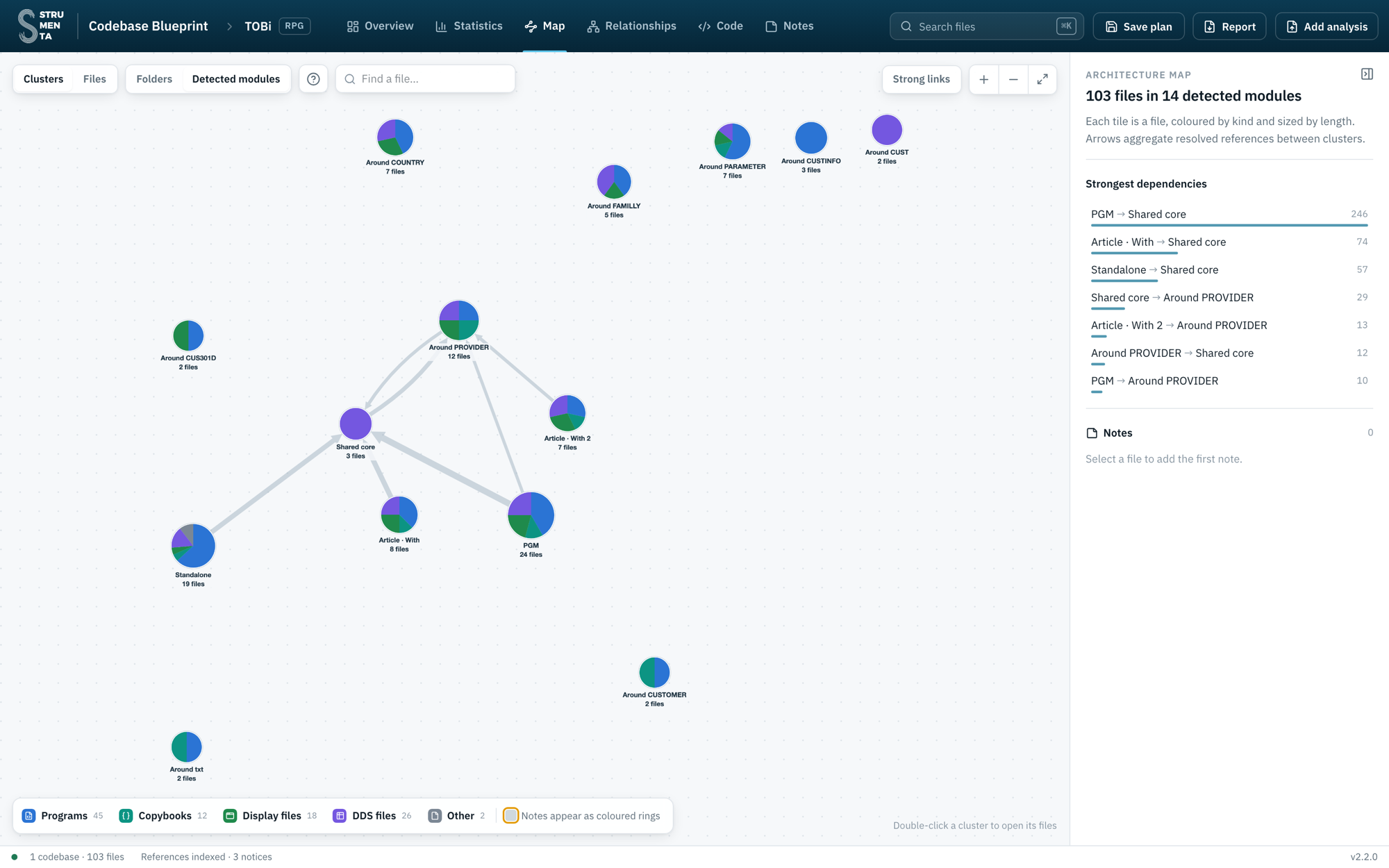
The tool groups files that are tightly related into modules: 14 in this case. Each module mixes programs, screens and database files. Modules give us the order of migration: we can migrate and test one module at a time, instead of doing one big, risky release.
We identify modules by finding clusters of relationships. Pretty neat, eh?
Following a change request
Now let’s use the tool for a real task. The business wants longer customer names: from 30 to 50 characters. What do we have to touch?
1. Where the size is defined
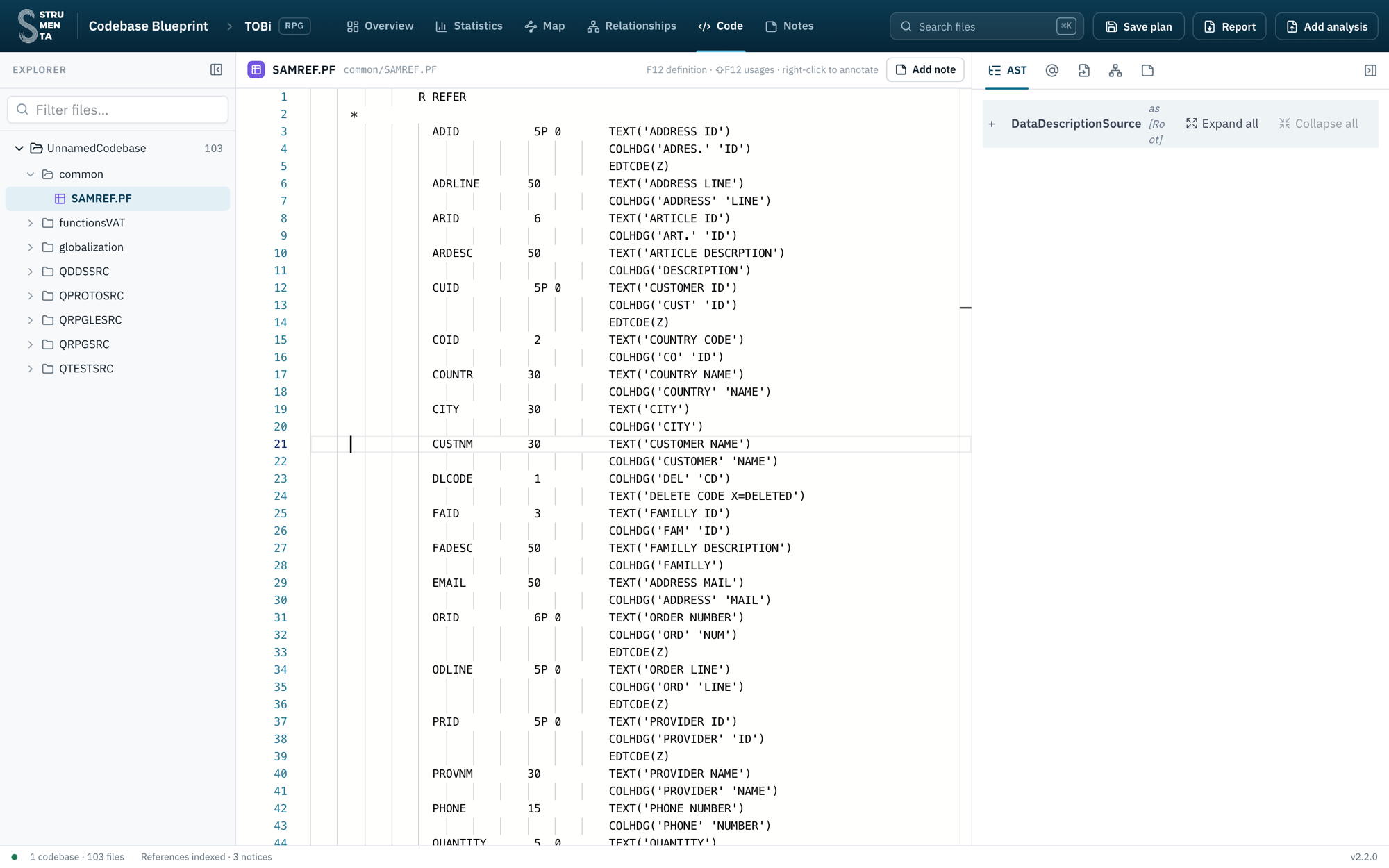
The size is in SAMREF, line 21: CUSTNM 30. The customer file does not repeat it. It just says CUSTNM R, a reference field, and the tool resolves that reference to SAMREF.
2. Who uses the customer file
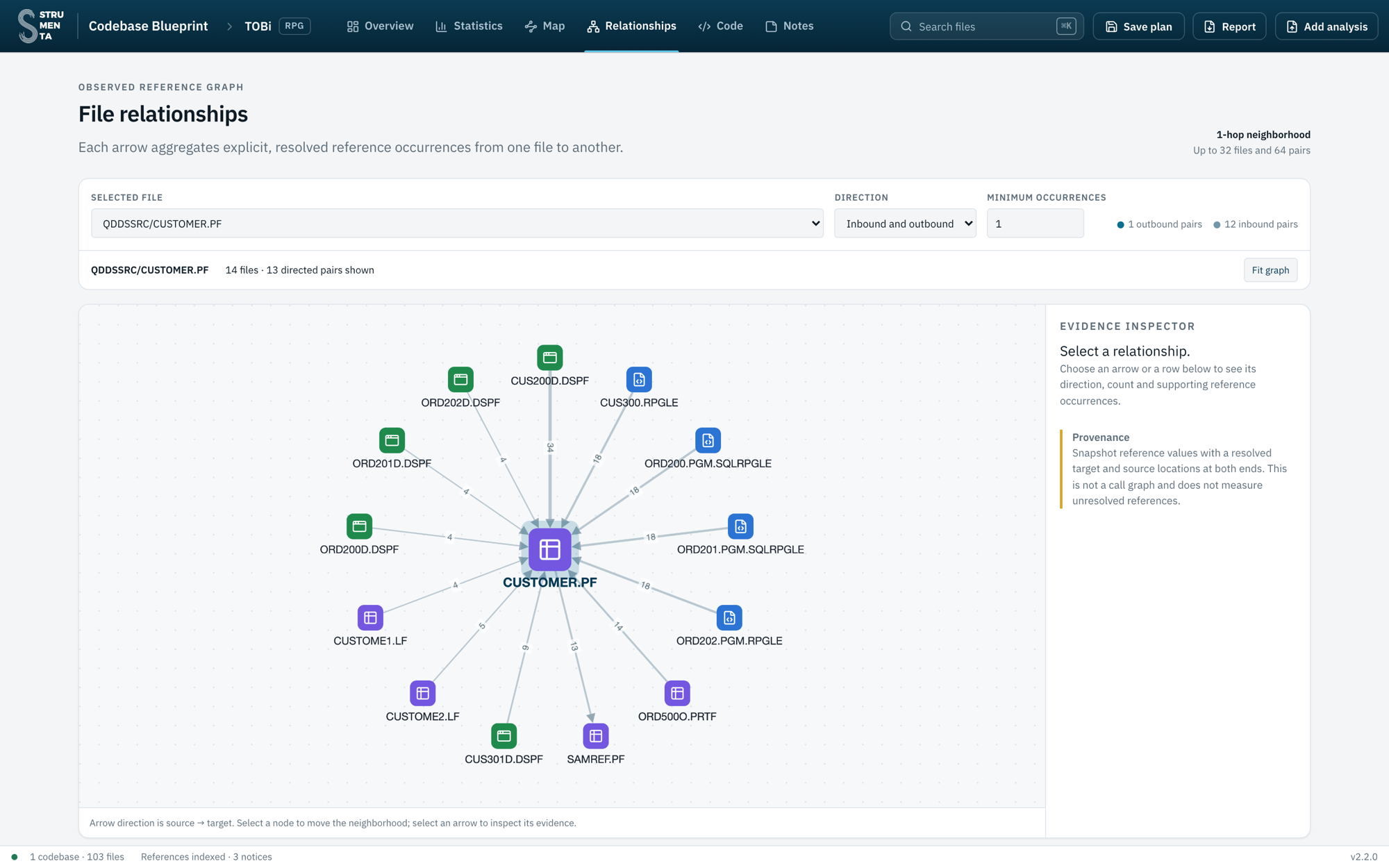
The Relationships view shows the neighbourhood of CUSTOMER.PF. Twelve files point to it, and it points to one file: SAMREF. Each arrow carries the number of references behind it, and we can click it to see them.
3. Who uses the field
We do not care about the whole file, just about one field. So in the References panel we filter by CUSTNM:
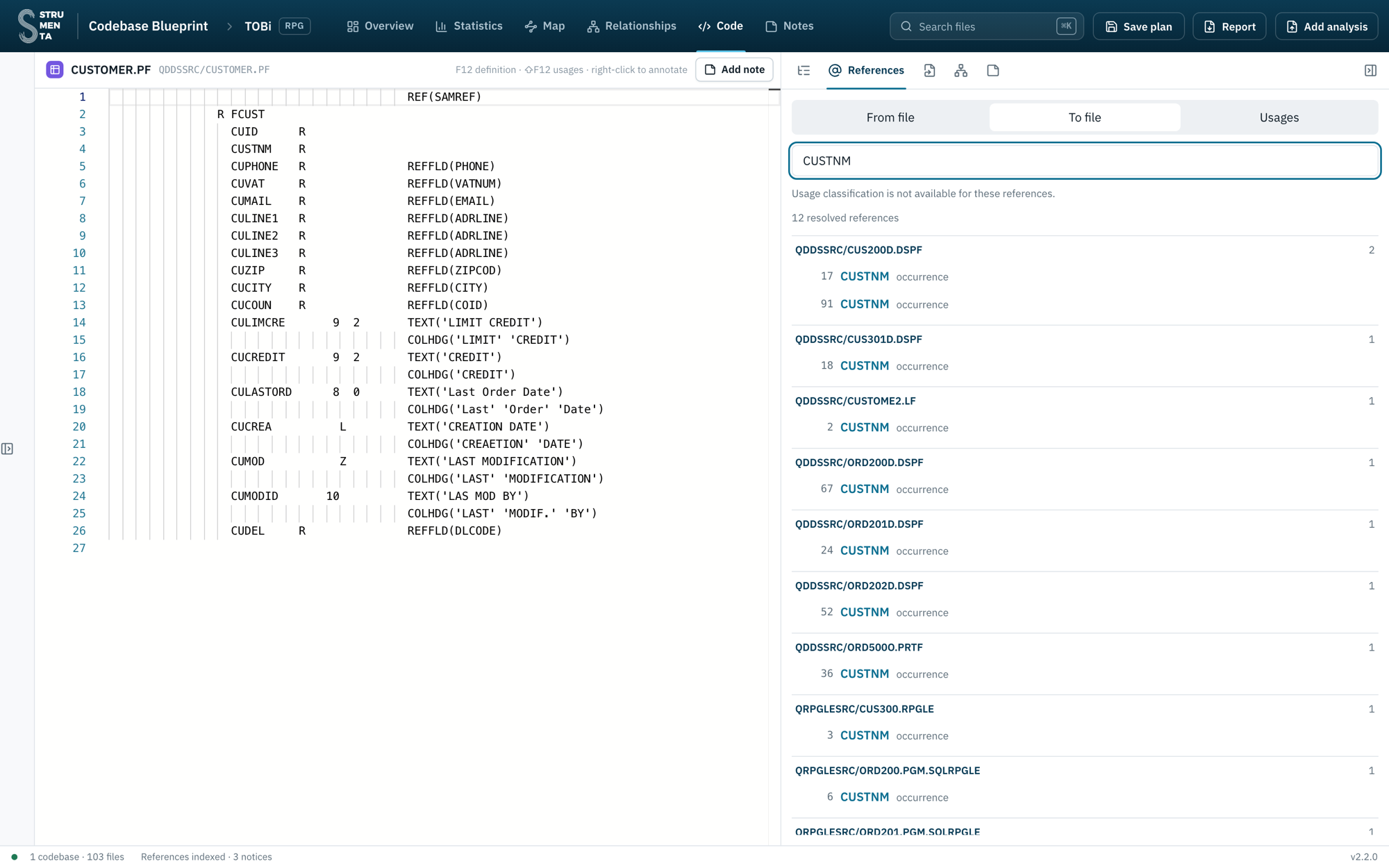
12 references in 11 files: 5 display files, the logical file CUSTOME2, the printer file ORD500O and 4 programs. CUSTOME2 is keyed on the customer name, so its access path changes too.
This is our list of places to check.
4. The screen
We open the first one, CUS200D, and switch to the Screen view.
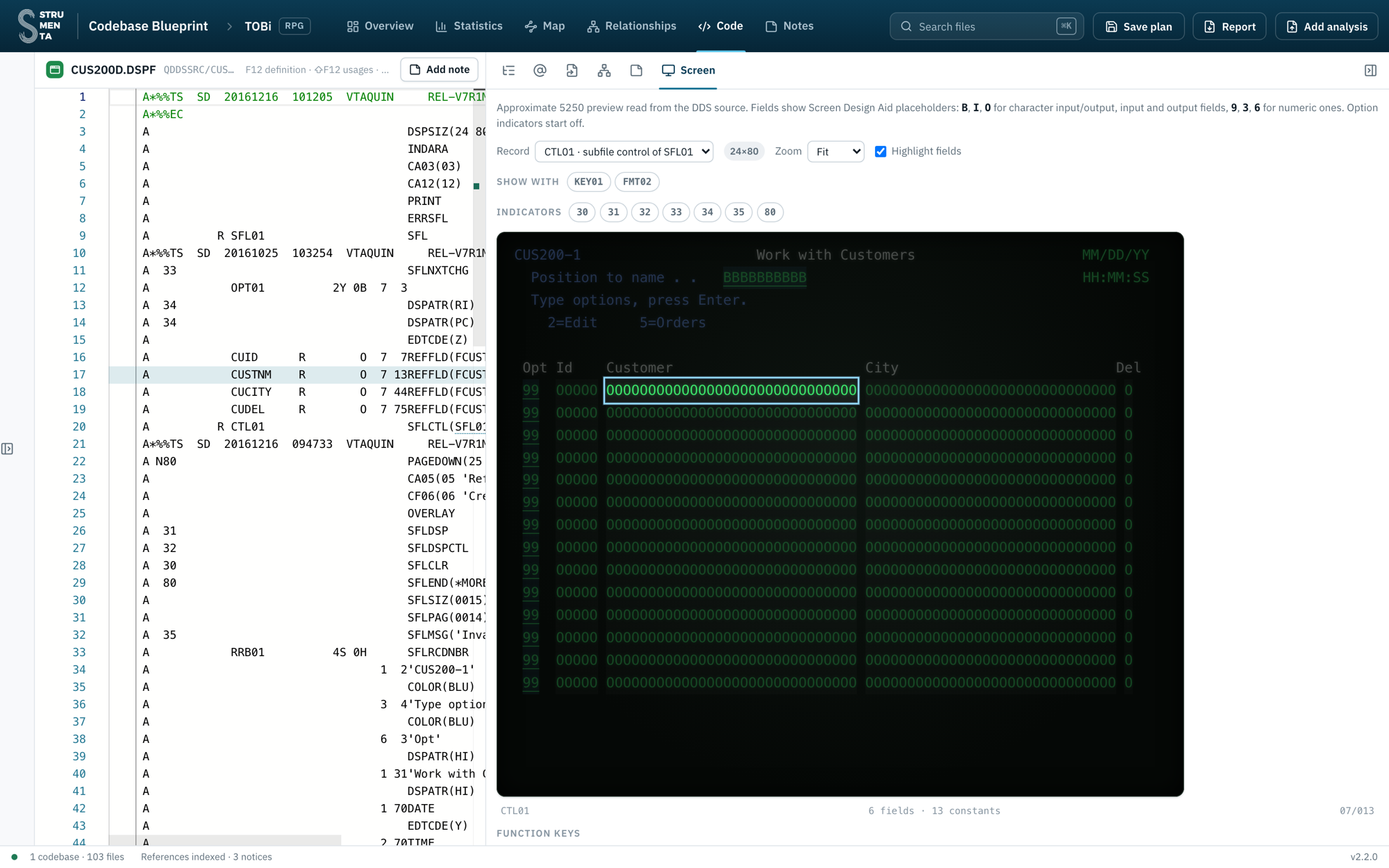
The screen is drawn from the DDS source. No emulator, no running system, no LLM guessing. Clicking the Customer column selects line 17 in the source.
And here we have a problem. The name starts at column 13, the city at column 44. At 50 characters the name runs over the city. This screen needs a new layout, not just a recompile.
5. Where the program reads the name
CUS300 is the customer service module. Its procedure GetCusName chains the customer by ID and returns CUSTNM. We put the cursor on CUSTNM and press Shift+F12:
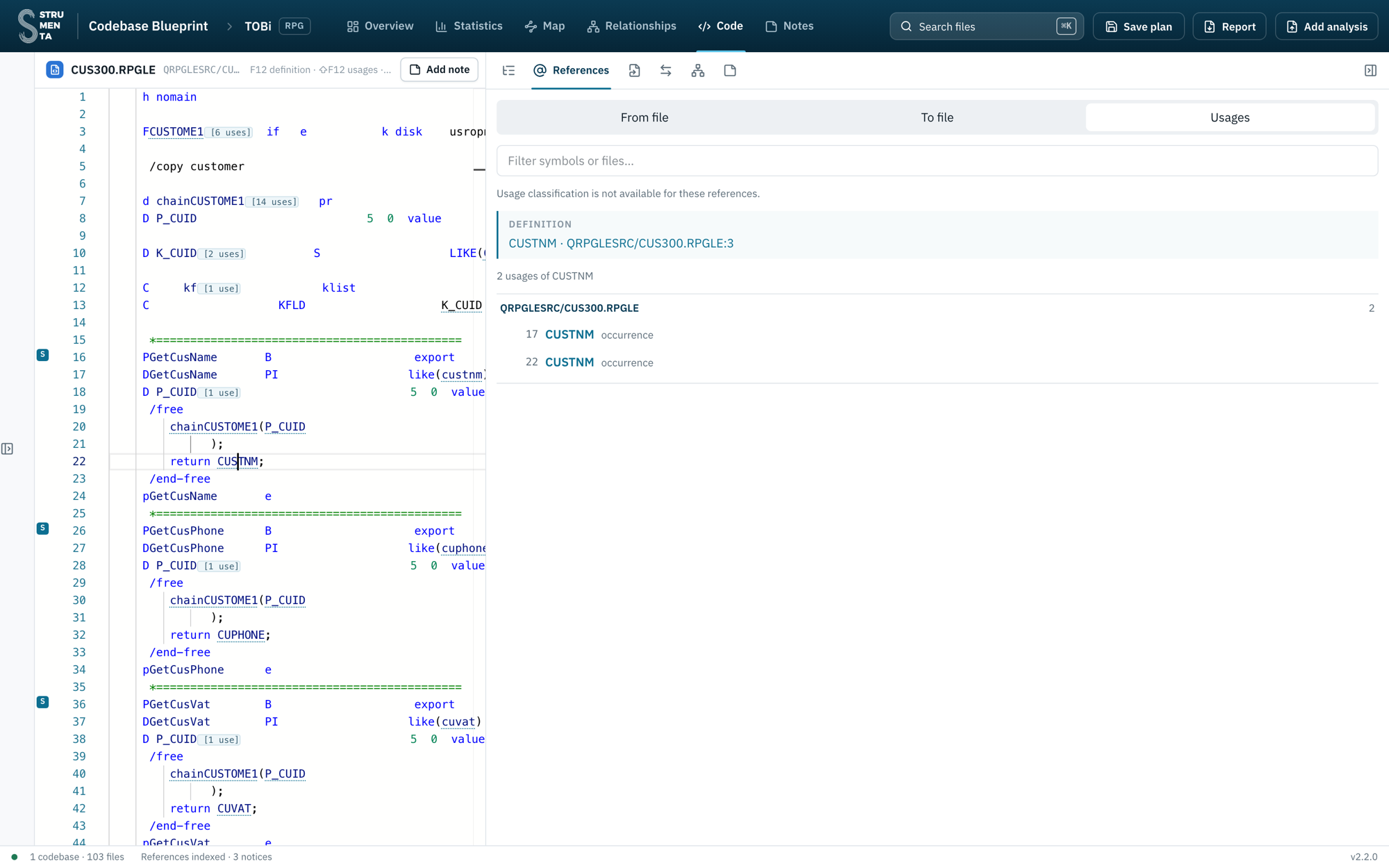
The field is not declared in the program. It comes from the file declared on line 3. Pressing F12 from there we reach the logical file CUSTOME1, and from it the physical file CUSTOMER. From the program to the database, one step at a time.
Notice also the small counters in the code, like [14 uses] on chainCUSTOME1.
6. A hard-coded length
The order program ORD100 gets the name by calling GetCusName. F12 on the call takes us to the prototype, in a copybook:
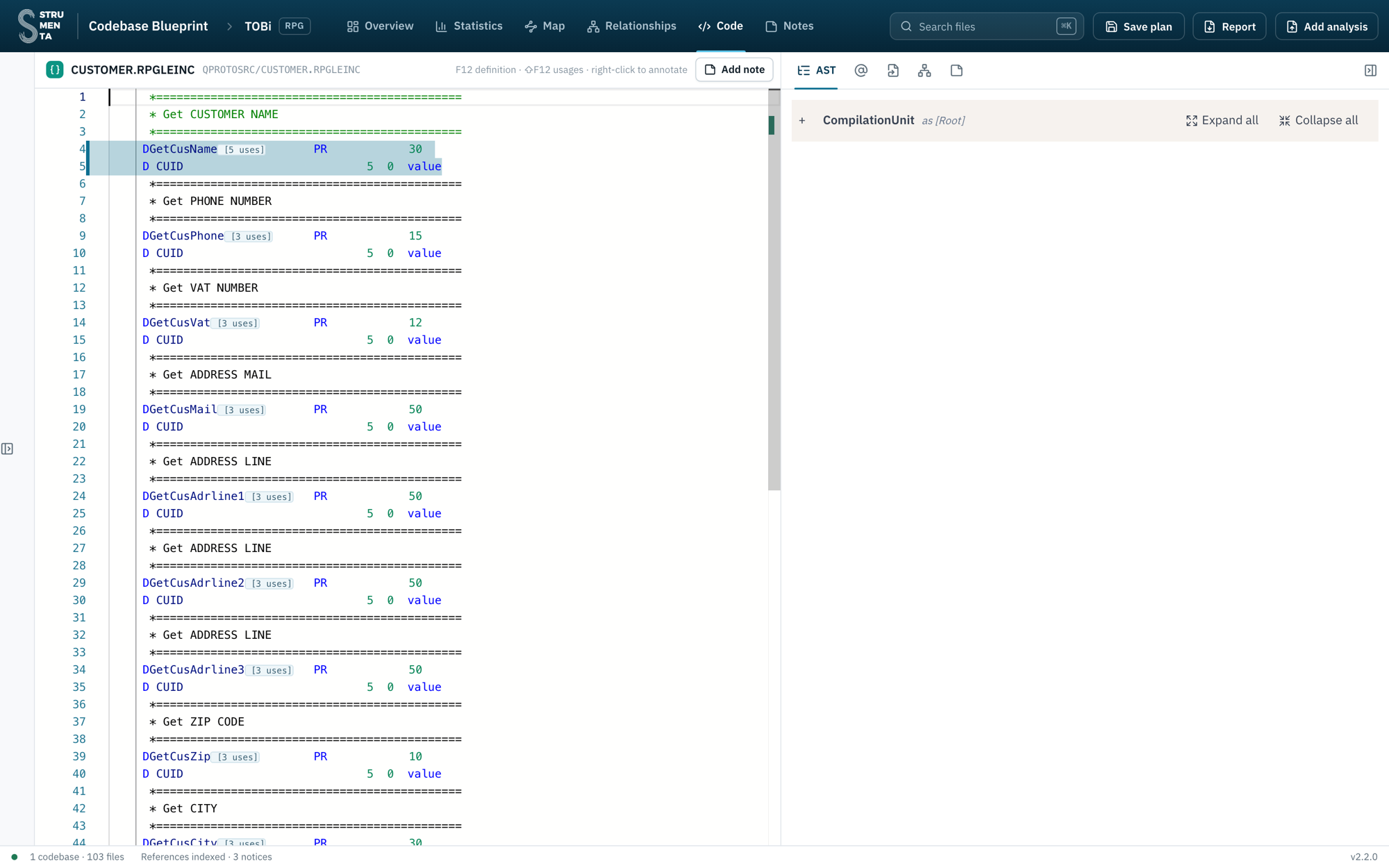
PR 30. The prototype returns 30 characters, hard-coded. It does not come from SAMREF. If we change only SAMREF, the name gets silently truncated here.
No reference field would have told us that. We found it by following the code.
7. What happens when an order is confirmed
A view I personally like is the sequence diagram. This is subroutine s01act in ORD100:
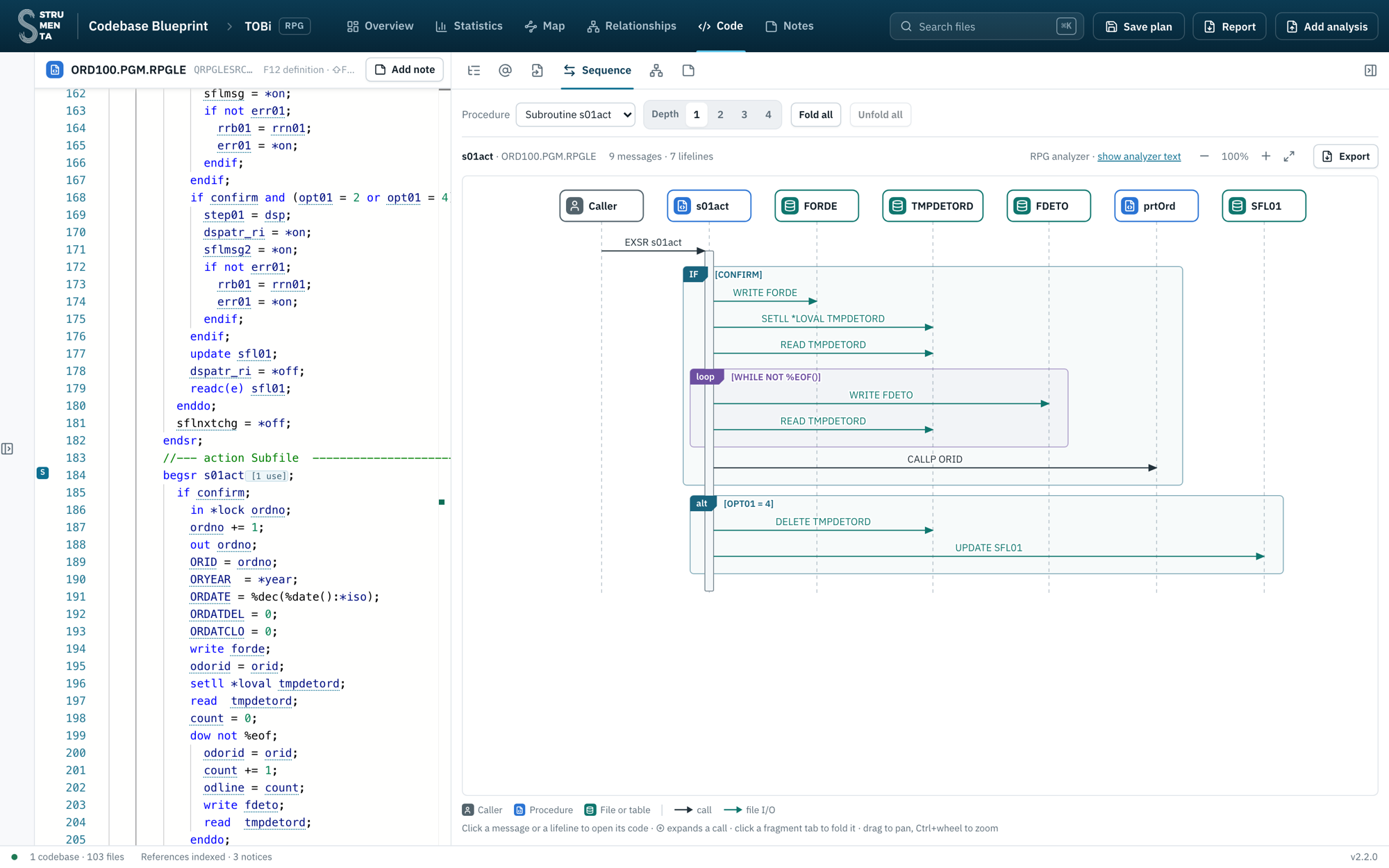
It is generated from the code. If the order is confirmed, we write the order, read the temporary lines and write each detail, then call prtOrd. If the option is 4, we delete the temporary lines and update the subfile. Clicking a message opens the corresponding statement.
Years ago we wrote about transforming RPG code into sequence diagrams, using our RPG parser and PlantUML. This is where that idea ended up.
prtOrd is an external program, ORD500, and the source of ORD500 is not in the codebase. Its printer file is (we saw it among the 12 references), but the program is not. This happens all the time: some code was lost, some is out of scope. The tool works with what we have and shows us what is missing. Here we have a question for the client.
Notes: collecting decisions
Until now we were “just” understanding, but we do that for a purpose, which is to make decisions.
We capture those decisions through notes. We can right-click on a file or a procedure and add a note.
Notes have types. We can use them to say we want to:
- drop something
- merge something into something else
- rename something
- clarify something, because it is unclear
- or just leave a comment
For example:
- ORD500 is missing: we add a note to ask the client about it.
- The name S01ACT is not exactly self-explanatory: we suggest a rename.
- CloseCUSTOME1 seems to be unused: we mark it for removal.
- DAT001 and DAT002 could perhaps be merged, because DAT002 covers just a corner case.
When we are done, we save everything in a single file. It contains the analysis data together with all our notes. That is the basis for our plan.
Reports
Navigating the code inside the tool is useful, but not everybody will use the tool. So we can generate three reports to share with everybody:
- Codebase statistics
- Architecture assessment
- Change plan
The change plan is the most interesting one for our example. It contains all our notes. If we put a note on a procedure, the report also includes the sequence diagram of that procedure, so the reader gets some context.
Why it works for us
This tool proved very valuable for us. We are always in the position of having to become familiar with a codebase very, very quickly.
It also helps us navigate the code together with the client’s people. Different stakeholders know different parts of the system. Some are technical, some are not. With the tool we can look at the same screen, the same program, the same diagram, and discuss it. And we collect decisions as we take them, so at the end they are exported into a well-organized plan, instead of being lost in meeting notes.
We use it mainly to plan migrations. But the same features are useful to plan a refactoring, or simply to maintain a codebase and get familiar with it.
Where I think this is going
When we started building this tool, I thought of it as something that we needed because we had a few weeks to learn about a codebase developed in decades.
But I am starting to think that tools like this one will be needed by many more software engineering teams in the future.
The fact is that codebases are evolving much faster (I wonder who is the culprit of that…). And this means that it is getting A PAIN to keep up with what is going on. So either we give up or we find a way to maintain an overview of the codebases. If we don’t, we keep accumulating features that are no longer relevant, we get architecture drift, we get repetitions. And we just do not know what we have.
I think this will happen more and more. So we will need tools to see what is in our codebases. In this way we will be able to do one thing: simplify. Otherwise this complexity will blow up in our faces.

I build parsers, transpilers and languages for people whose work is too specific for off-the-shelf software. I co-founded Strumenta, in Torino.
Reply by email · I read everything.
If this was useful, there are more on the same problem.
More in Legacy systems & modernization
Why Gherkin Is the Right Testing Tool for RPG Migration — And It Has Nothing to Do With BDD AI RPG Migration Can Compile and Still Break Business Logic Joining forces to modernize legacy softwareA legacy estate you need to understand before you commit.
See how Strumenta worksDisclosure — Strumenta is a company I co-founded.